Git Learning Notes
 Lou Chang included in Learning
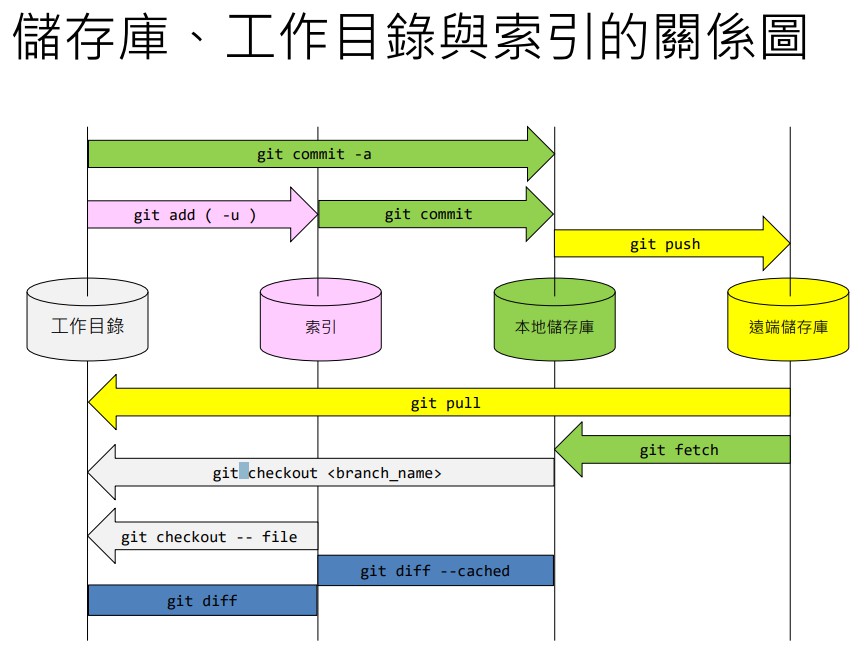
Files in the index : Tracked files Files not in the index : Untracked files
- working tree is the working directory
- When indexed file content and working directory file content match the state is called “Stage”
- When indexed file content and working directory file content do not match the state is called “Unstage”
Version-Control Commands
Command: git
-m= messageinit= initializeadd= add to the indexrm= removestatus= show current status
git diff
Show differences
HEAD= compare changes against the latest version-cached= compare indexed changes against the latest local commit--binary= compare binary file differences--name-only= compare working directory files and list filenames only--name-status= list how many files between the working directory and the index have been modified
git diff 'src-commit' 'tgt-commit'compare differences between two commitsgit diff 'commit'differences against the target commit
git reset
Reset the index
-p= select which changes in the index to remove from the indexHEAD= reset the index and the branch (add ~1 to revert to the previous version, and so on)--mixed= reset HEAD and the index (default)--hard= reset HEAD, the index, and the working directory--hard ORIG_HEAD= revert to the previous version (always reverts to the version before the reset)
git revert
Revert a historical version by creating an opposite commit
-h= help, list features--abort= cancel--continue= continue--quit= stop
git clone
Download a remote repository
git clone --no-checkout 'URL' 'Filename'uses the given filename and skips checkoutgit clone --bare 'url'downloads the repository itself (bare)
git log
View history
--oneline= short log format--oneline --graph= short log format + branch graph; add “-number” to limit entries
git log --oneline --graph --all -10show 10 entries from the full history
git reflog
Records every version-control operation performed in the working directory
git checkout
Check out / retrieve
-- 'name'= copy the file named “name” from the index back into the working directory--orphan= create a new branch with no parents
checkout -b "Filename"creates a new branch and switches to it
git switch
Switch branches
git clean
Clean the working directory
-f= force delete-d= delete the entire working directory-x= run the clean task, ignoring .gitignore settings-n= show which files would be cleaned
git stash
Temporarily store working directory changes
save 'message'= stashpop= retrieve the stash
git branch
View branches / create branches
-d= delete a branch (only already-merged branches)-D= force-delete a branch-r= list all remote-tracking branches-a= list all remote + local branches
git branch --mergedlist all branches that have been mergedgit branch --no-mergedlist all branches that have not been mergedgit branch --merged | egrep -v "(^\*|master|develop)" | xargs git branch -ddelete all merged branches (not available in CMD/PowerShell)
git merge
Merge branches
--ff= fast-forward merge (default)--no-ff= non-fast-forward merge--ff-only= fast-forward merge only--no-commit= merge without committing--abort= abort the merge--squash= squash merge (cannot be used with no-fast-forward, and no merge graph will appear)
git merge --no-ff --no-commit 'branchName'merge without committing
git rebase 'commit_id'
Rebase merge
-i--continue= continue--skip= skip--abort= cancel
git cherry-pick
Cherry-pick merge
--continue= continue--quit= stop--abort= cancel
git push
Push to remote
--all= push all branches
git push -u origin masterlink the local branch (master) with the remote branch (origin)git push origin --delete‘branchName’ delete a remote branch (delete the local branch first)
git fetch
Download changes from the remote repository
--pruneprune remote branches that have been deleted
git pull
Pull from the remote repository
pull=git fetch+git mergegit pull --rebase=git fetch+git rebase
git remote
Remote
-v= list URLs-h= help for remoteset-url= change the URL
git remote set-url origin 'new url'change the old URL to a new URL
git commit
Create a version
git apply
Apply a version (forward)
--check= verify files--reverse= reverse (shorthand -R)
git config
Version-control settings
Add
--globalto set globally
core.quotepath= set to false to display CJK characterscore.editor= view the current editor
Version control can only display ASCII characters by default
- To enable CJK display in environments other than the bash shell:
set LC_ALL=C.UTF-8
- Change the environment variable (permanent)
setx LC_ALL C.UTF-8- macOS / Linux
export LC_ALL=C.UTF-8
Merge Conflicts
Message shown:
- content = content conflict
Manual resolution is recommended