Golang Learning Point
 Lou Chang included in Go
Contents
Golang Learning Point
Reasons Golang Was Created
- Simplicity
- Fast compilation
- Compiled language
- Strongly typed
- Built-in concurrency support
- Automatic garbage collection
Applicable Scenarios
- Web Development
- Command-line Interfaces(CLIs)
- Cloud & NetWork Services
Golang Compatibility
GO 1.X new versions are guaranteed to be backward compatible, except for the following four cases
- Security errors
- Specification errors
- Unintended behaviors
- Bugs
Common Command-Line Commands: Running Programs
go run .(run the program)go build .(build the project)
go build -v -o dist/main .(show verbose output during build and specify output path)
go clean(clean the project — delete files generated during the build process)
go clean -i(also delete installed programs)go clean -i -n(the-nflag previews files that would be deleted)go clean -cache(clean build cache files)go clean -cache -n(preview cleaning of build cache files)go clean -modcache -x(clean module cache and display delete commands)go clean -i -cache -modcache -x
Common Command-Line Commands: Running Tests
- File naming rule: *_test.go
- Running the program: not applicable (using
go run .will automatically ignore *_test.go files) - Building the project: no need to build (using
go buildwill automatically ignore *_test.go files)
- You can use
go test -cto compile the test binary (but it will not run the tests) - Run tests:
go test . - Clean cache:
go clean -testcache - Benchmark testing:
go test -bench=. -v
Other Common Command-Line Commands
go version(display the Go runtime version)go env(display Go-related environment variables)- Other commands well-integrated by development tools
go getdownload packagesgo fmtformat source codego vetcheck source code qualitygo fixautomatically fix problematic source codego docretrieve API documentation from source code
Golang Cross-Platform Support
Reserved Keywords
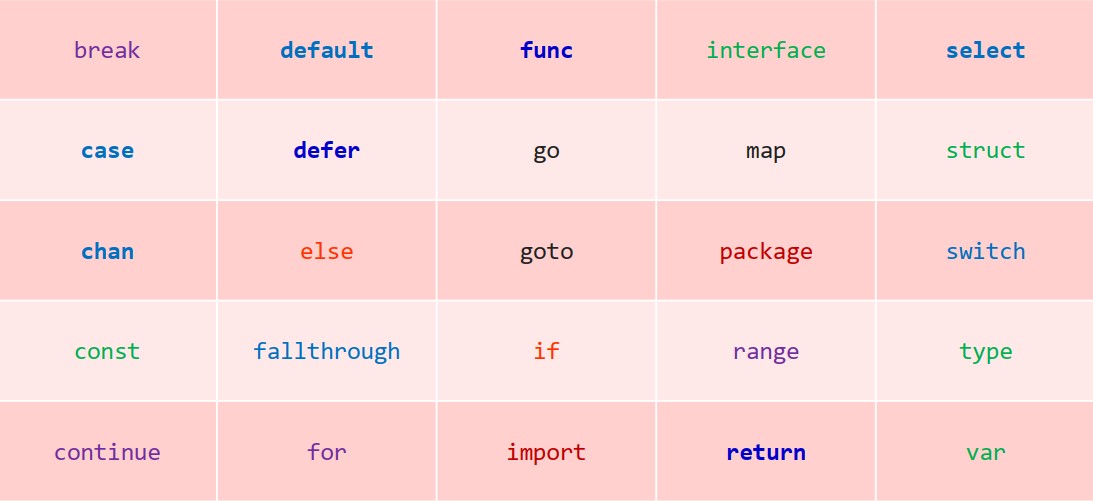
Automatic Semicolon Insertion Rules
- Identifiers
- Values
integer,floating-point,imaginary,rune,stringtrueandfalseare not values
- The following four keywords
breakcontinuereturnfallthrough
- The following five operators and punctuation marks
)}]++--
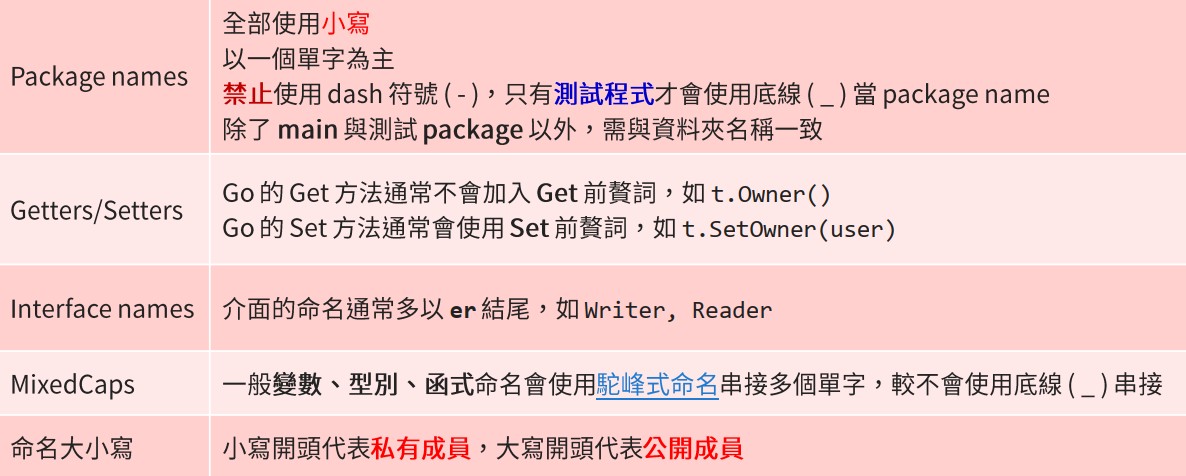
Naming Conventions
Variable Declaration
var score int = 95
varis a keywordscoreis the variable nameintis the type95is the initial value
":=" declares a variable and assigns a value
A “*” prefix indicates a pointer
There are two ways to declare variables
|
|
|
|
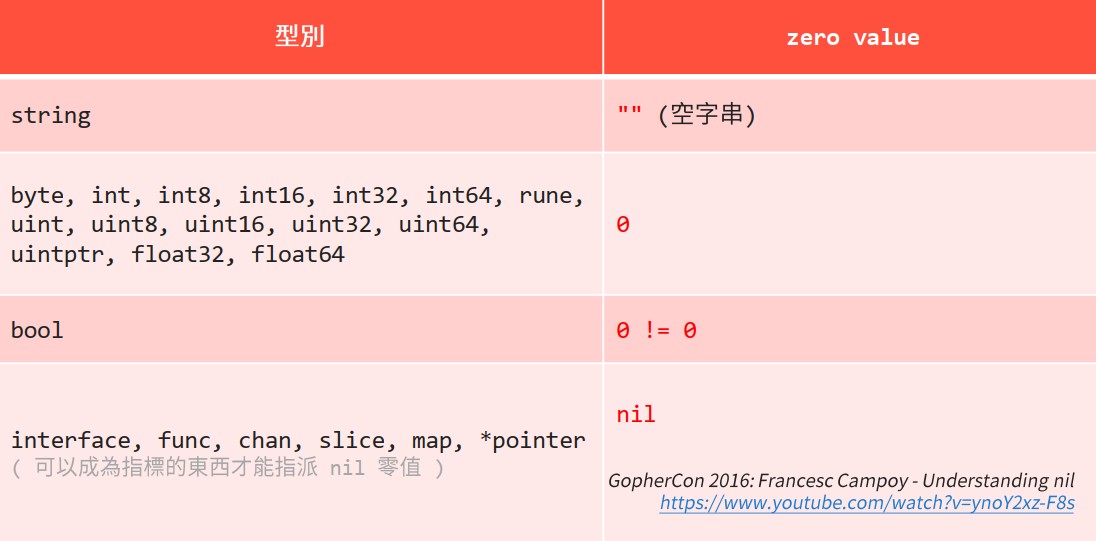
Zero Value
Type Inference
var name = "will"
Shorthand syntax
name := "will"
Constant Declaration (Basic Types Only)
-
Numeric:
byte,int,int8,int16,int32,int64,rune,uint,uint8,uint16,uint32,uint64,uintptr,float32,float64,complex64,complex128 -
Boolean:
bool -
String:
string
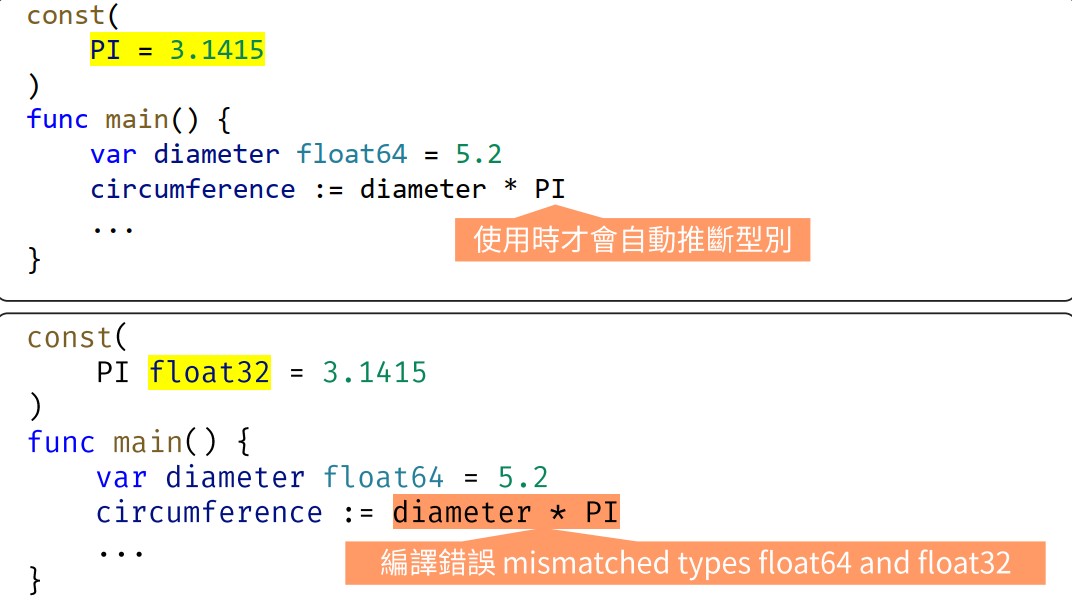
Untyped Constants
Auto-Incrementing Constants with iota
|
|
Is equivalent to
|
|